Project Metadata¶
PyPI displays three types of project metadata:
- PyPI data: System metadata managed by PyPI
- Verified data: Author-provided metadata that PyPI verified at the time of upload
- Unverified data: Author-provided metadata that PyPI did not verify
This documentation is about the metadata package authors can provide about a project, and how that metadata is surfaced on PyPI. The full list of metadata is available in the Python Packaging User Guide.
Project name, version, and summary¶
The project name, release version, and a one-line summary are shown at the top of every project page.
- Name: The project's registered name on PyPI, from the
namefield inpyproject.toml. See Choosing a Project Name for naming rules and availability. - Version: The version of the release being viewed, from the
versionfield. - Summary: A short, one-line description of the project, set via the
descriptionfield inpyproject.toml. Also called the "short description" — see Project Descriptions for how to write one.
Version length limit¶
As of 2026-10-23, PyPI rejects new uploads whose version is longer than 128 characters.
The limit applies to the version after it has been
normalized,
which is the form PyPI displays. Normalization tidies up how a version is written without changing what it means, so a version like 1.00 is counted
as 1.0. Releases published before this limit was introduced are not affected.
If your upload is rejected, youll see an error like this:
HTTPError: 400 Bad Request from https://upload.pypi.org/legacy/
The version must be 128 characters or less after normalization, but is 140 characters.
See https://docs.pypi.org/project_metadata/#version-length-limit for more information.
To fix it, choose a shorter version for the release. 99% of releases on PyPI
have versions of 20 characters or fewer, such as 1.4.2, 2026.10.0, or 3.0.0rc1.
Project links¶
Packages owners can specify various URLs related to their project using
the [project.urls] table in the package's pyproject.toml.
PyPI lists all URLs together on the project page, marking those that have been verified at the time of upload. They are also available using the JSON API.
Verified links¶
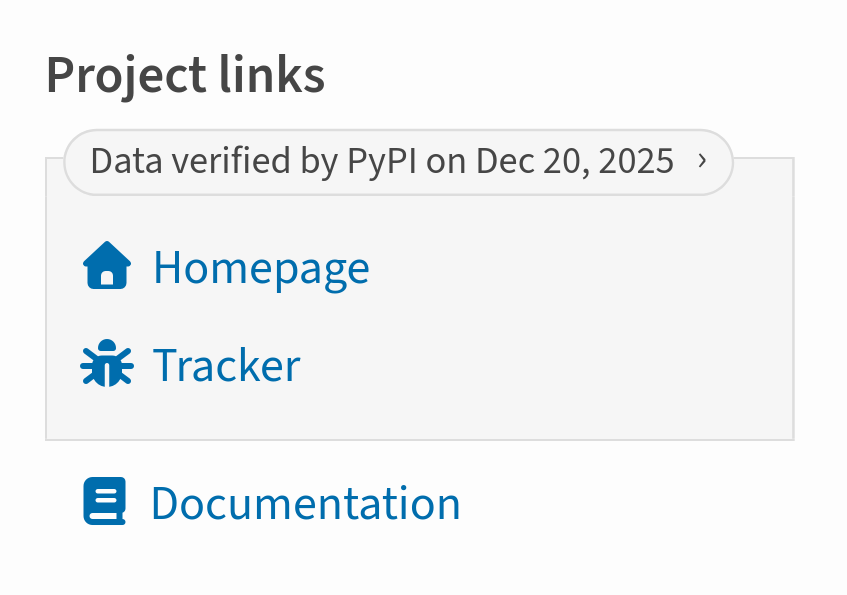
PyPI currently supports several ways of verifying project URLs. When a URL is verified, PyPI labels it accordingly:
Warning
Verification only attests that the PyPI package owner controlled the URL at the time of upload — it says nothing about the URL's current safety, ownership, or relationship to the project.
Verification isn't repeated after upload. A URL can change hands, change content, or stop working entirely, and it will still display as verified.
Verifying links via Trusted Publishing¶
Trusted Publishing allows PyPI to attest that the publishing workflow for a package is coming from a verified source.
The URLs that can be verified depend on the Trusted Publisher used:
- GitHub Actions: Packages uploaded using GHA from a repository will have the GitHub URLs for that
repository verified. For example, for the
pypa/piprepository, the following URLs will be verified:https://github.com/pypa/piphttps://github.com/pypa/pip/*(all subpaths)https://github.com/pypa/pip.githttps://pypa.github.io/piphttps://pypa.github.io/pip/*(all subpaths)
- GitLab CI/CD: Packages uploaded using GitLab CI/CD from a repository will have the GitLab URLs for that
repository verified. For example, for the
pypa/piprepository, the following URLs will be verified:https://gitlab.com/pypa/piphttps://gitlab.com/pypa/pip/*(all subpaths)https://gitlab.com/pypa/pip.git
- Google Cloud: No Google-specific URLs are currently verified.
- ActiveState: Packages uploaded using ActiveState will have URLs linked to the project in ActiveState
verified:
https://platform.activestate.com/pypa/piphttps://platform.activestate.com/pypa/pip/*(all subpaths)
PyPI URLs are automatically verified¶
PyPI considers any URL pointing to that project on PyPI as verified.
For example, the project page for pip will mark all of the
following as verified:
https://pypi.org/project/pip/https://pypi.org/p/pip/https://pypi.python.org/project/piphttps://pypi.python.org/p/piphttps://python.org/pypi/pip
Link icons¶
While project links can use any label or URL, PyPI will automatically apply a custom icon if the label or domain is recognized.
Rules:
- The table order is the priority order. Each rule is evaluated top to bottom, and the first one that matches — whether by label or by domain — wins. For example, a GitHub link labeled "Homepage" gets the house icon, because the Homepage label rule is checked before the GitHub domain rule further down the table.
- Label matches are case-insensitive and match the whole label, except where marked
*, which matches a prefix instead. - Domain matches include subdomains, except where marked
†, which match that domain exactly only.
| Name | Icon | Matches |
|---|---|---|
| Download | Label: Download | |
| Homepage | Label: Home, Homepage, Home Page | |
| Changelog | Label: Changelog, Change log, Changes, News, Whatsnew, What's new, History | |
| Release notes | Label: Releasenotes, Release notes | |
| Documentation* | Label: Docs*, Documentation* Domain: Read the Docs domains (including rtfd.io/rtfd.org), or any URL starting with docs. or documentation. |
|
| Bug* | Label: Bug*, Issue*, Tracker*, Report* | |
| Funding* | Label: Funding*, Sponsor*, Donation*, Donate* | |
| Security | Label: Security, Security Policy, securitypolicy | |
| GitHub | Domain: github.com, github.io |
|
| GitLab | Domain: gitlab.com |
|
| Codeberg | Domain: codeberg.org, codeberg.page |
|
| Gitter | Domain: gitter.im |
|
| Discord† | Domain: discord.com, discordapp.com, discord.gg |
|
| Telegram | Domain: t.me, telegram.me, telegram.dog |
|
| Matrix† | Domain: matrix.to |
|
Domain: google.com |
||
| Bitbucket | Domain: bitbucket.org |
|
Domain: reddit.com |
||
| Slack | Label: Slack* Domain: slack.com |
|
Domain: twitter.com, x.com |
||
| Bluesky† | Label: Bluesky Domain: bsky.app |
|
| AppVeyor | Domain: ci.appveyor.com |
|
| CircleCI | Domain: circleci.com |
|
| Codecov | Domain: codecov.io |
|
| Coveralls | Domain: coveralls.io |
|
| Travis CI | Domain: travis-ci.com, travis-ci.org |
|
| PyPI† | Domain: cheeseshop.python.org, pypi.io, pypi.org, pypi.python.org |
|
| Python | Domain: python.org, *.python.org |
|
| Youtube | Domain: youtube.com, youtu.be |
|
| Mastodon | Label: Mastodon | |
| Source | Label: Source, Source Code, Sourcecode, Repository |
Owner, author and maintainer details¶
PyPI shows owner, author, and maintainer information in three separate places:
1. Owner¶
Shown only for projects owned by a PyPI Organization. This data is taken directly from the organization's PyPI account, and is not provided by the package maintainers via pyproject.toml.
Projects owned by an individual account don't show an "Owner" section — that account instead appears in Maintainers below.

2. Maintainers¶
This shows every PyPI user account with a role on the project. This data is taken directly from the project's PyPI settings, and is not provided by the package maintainers via pyproject.toml. When there are more than three users associated with a project, PyPI displays the first three with a "+N more" disclosure to expand the rest.

3. Credits¶
Packages can specify an author or maintainer (name, email address, or both) in their metadata, using the authors and maintainers fields in pyproject.toml.
By default, this is shown in the "Credits" section of the project page exactly as provided in the package's metadata:

If an email address was given, PyPI also cross-references it at upload time against the public, verified email addresses of the PyPI accounts associated with the project. If PyPI finds a match, the email address is labeled as verified:

As with project URLs, this cross-referencing only happens once, at the time a release file is uploaded — it does not repeat afterward.
Repository statistics¶
If a release has a verified GitHub or GitLab repository URL, PyPI shows a "GitHub Statistics" or "GitLab Statistics" panel with live stats for that repository — stars/forks, open issues, and open pull/merge requests.

Info
Only the repository URL itself is verified by PyPI, at upload time. The statistics shown (stars, forks, open issues/PRs) are fetched live from GitHub or GitLab and are not independently verified by PyPI — they reflect whatever that repository currently reports, and can change at any time after the release was uploaded.
License¶
PyPI displays license information in one of two forms, depending on what the release provides:
- License expression: If the release specifies the
licensefield inpyproject.tomlas an SPDX license expression (license-expressioncore metadata field), that expression is shown along with a link to the SPDX license list. This is the recommended way to declare a project's license. - License: Otherwise, PyPI falls back to combining any legacy
Licensetrove classifiers with the free-text legacylicensefield (truncated to its first line, or to 100 characters if that's still too long).
If a release provides neither, no License section is shown. PyPI does not check that the stated license matches the project's actual licensing.
Info
As of PEP 639, License trove classifiers are deprecated. New projects should declare their license as an SPDX expression in the license field instead — see license expressions in the Python Packaging User Guide.
Requires Python¶
If a release specifies the requires-python field in pyproject.toml (the Requires-Python core metadata field), the supported Python version range is shown, e.g. >=3.9.
Provides Extra¶
If a release declares optional dependencies (extras) via [project.optional-dependencies], the names of those extras are listed here, e.g. pip install project[extra-name].
Tags¶
Packages can specify free-text keywords using the keywords field in pyproject.toml. PyPI displays these as a list of tags.
Classifiers¶
Packages can specify trove classifiers — a fixed, structured taxonomy maintained by PyPI — using the classifiers field in pyproject.toml. PyPI groups classifiers by their top-level category (e.g. Programming Language, License, Topic) and links each one to a search filtered on that classifier. PyPI does not check that the selected classifiers accurately describe the project.
License classifiers are also used to build the License section when no SPDX license expression is provided. Note that License classifiers are deprecated by PEP 639 and new ones will not be added to PyPI — see the note in License.